Skip to content
On-device macOS

Meeting notes that write themselves — on your Mac

You talk.
fol closes the loop.

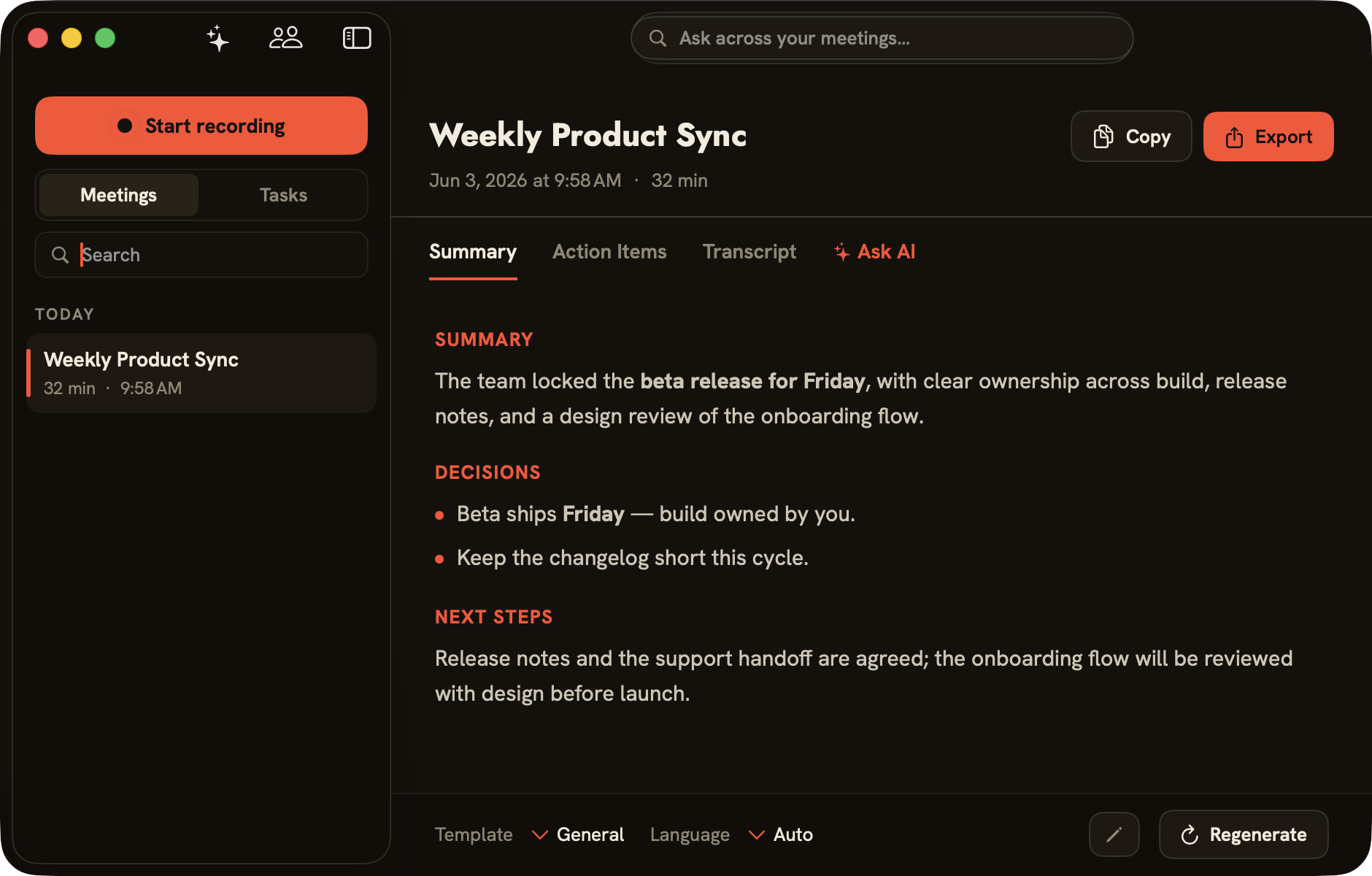
folo notices when you’re in a call, records both sides, and — by default entirely on your Mac — turns it into a transcript, who-said-what, and action items. Ask across every meeting you’ve ever had. No bot joins the call.

Less than four months of a meeting-AI subscription — and your audio stays on your Mac by default. All kveik software is in beta until 1 August 2026.

folo app showing a transcribed meeting with summary, decisions and next steps
05:32
  • No bot
  • Local transcription available
  • Audio on your Mac by default
  • macOS 15+ (Apple Silicon)

The difference

Meeting transcribers usually send a bot into your call and your audio to their servers. folo is local-first. It records quietly on your Mac. Select WhisperKit, SpeechAnalyzer or Parakeet globally to transcribe locally; ElevenLabs uploads meeting audio when selected.

Local-first, with explicit cloud choices

From detecting the call to who-said-what, action items and your invoice — local-first, bot-free and a one-time purchase.

01

It knows when you’re in a meeting

folo detects calls in Zoom, Teams, Meet, Webex, Slack or Discord and offers to record. No setup per app — it listens to audio, not to integrations.

ZoomTeamsMeetWebexSlackDiscord

Audio-based · no per-app setup

02

Bot-free, on-device recording

System audio + your microphone, captured on your Mac. Nothing joins the meeting. Audio is deleted after transcription by default.

01:32

System audio + mic · deleted after transcription

03

Choose local or cloud transcription

Pick a global transcription backend in Settings: WhisperKit, Apple’s built-in SpeechAnalyzer or NVIDIA Parakeet process audio on-device. ElevenLabs Scribe uploads meeting audio only when globally selected.

WhisperKit Selected
Apple SpeechAnalyzer On-device
Parakeet On-device
ElevenLabs (opt-in) Cloud

3 local engines + cloud option · 25 EU languages + JA/ZH

04

It knows who said what

On-device speaker recognition separates everyone in the room — not just you vs. the rest. Name a voice once and folo recognizes that person in every future meeting. Voice profiles stay in the local speaker database and are not included in cloud-backend requests or webhook payloads.

You 6:18
Sarah Chen 4:02
Mark Devlin 2:47

Named once · recognized every meeting

05

Summaries that end in action items

Every meeting becomes a structured summary — decisions, next steps and a clear list of action items — in templates for General, 1:1, Standup or Sales/Customer. The global backend is Apple Intelligence, Ollama or Local MLX for local processing; Anthropic via a direct API key; or Claude Code (Anthropic cloud via local CLI).

Ship beta on Friday — build
Send support handoff doc — Sarah
Review onboarding flow — design
Apple Intelligence · localOllama · localLocal MLX · local Anthropic · cloudClaude Code CLI · cloud
06

Live recap while you’re still in the call

Optional live transcription and a running, AI-written digest during the meeting (beta) — so you can glance at what’s been decided without scrolling back.

Live digest

Decided: ship beta Friday, build owns it.

Open: support handoff doc — Sarah to send.

Updated live · still recording

07

Ask AI across every meeting

Ask about one meeting, or search your whole history. Answers come with clickable sources that jump to the exact moment it was said — powered by the same engine you chose, cloud or fully local.

What did we decide about the launch?
Beta ships Friday, owned by build.
08

Straight into Døgn

One toggle hands every finished meeting to Døgn, the companion time tracker — so the call you just had becomes tracked, billable time without retyping a thing. Reads your macOS calendar locally (EventKit) to label meetings — no calendar accounts. An embedded MCP server lets Claude/Cursor search your meetings.

Weekly Product Sync

32 min · finished

Døgn

+ 0:32 tracked

One toggle · meeting → billable time

Meet Døgn, the time tracker
09

Private by architecture

folo stores audio and transcripts in its local database. When globally selected, ElevenLabs receives meeting audio. For summaries, folo sends transcript text directly to Anthropic using the stored API key, or the locally installed Claude CLI sends it to Anthropic using its separate CLI authentication. Configured webhooks send only the selected event metadata — local numeric ID, suite UUID when available, title, start/end/duration, language, attendees, status and assignment engagement ID — to user-added HTTPS endpoints, not audio, transcripts or summaries.

Local database — audio & transcripts
API key in macOS Keychain
Cloud summaries can be turned off

folo vs cloud transcribers

Comparison of folo and cloud transcribers
foloCloud transcribers
Bot joins your call NoUsually yes
Audio leaves your device No — on-device by defaultYes
Speaker recognition On-device, rememberedCloud-side, if any
Works with any meeting app Yes — audio-basedPer-integration
Pricing €119 once€200–360 per year, per seat
  • macOS 15+
  • Apple Silicon
  • On-device transcription
  • On-device speaker recognition
  • Cloud or fully-local summaries
  • Sends finished meetings to Døgn
  • Signed & notarized
  • Auto-updating
  • One-time purchase

Download

Get folo for Mac

One download, signed & notarized. Updates install themselves from then on.

Download for Mac

v0.3.4 · 20.8 MB · macOS 15+ · Apple Silicon

All kveik software is in beta until 1 August 2026.

Questions, answered

Does a bot join?

No — local recording, nothing in the call.

Is my audio uploaded?

Local backends keep processing on your Mac. If selected globally in Settings, ElevenLabs Scribe receives meeting audio. For summaries, folo sends transcript text directly to Anthropic using the stored API key, or the locally installed Claude CLI sends it to Anthropic using separate CLI authentication. Configured webhooks send selected event metadata to user-added HTTPS endpoints, not audio, transcripts or summaries.

Which apps?

Any — it captures audio, not an integration.

Does it know who is speaking?

Yes — on-device diarization separates each speaker, and naming a voice once lets folo recognize that person in every future meeting.

What writes the summary?

One backend is selected globally in Settings: Apple Intelligence, Ollama or Local MLX process summaries locally; Anthropic Cloud sends transcript text directly using your API key; Claude Code sends transcript text to Anthropic through the local CLI, whose authentication is separate from folo.

Does it work with Døgn?

Yes — one toggle sends each finished meeting to Døgn, turning the call into tracked, billable time.

Subscription?

No — €119 once. One-time purchase with free updates.

Refunds?

Refunds are handled by Paddle under their buyer terms — reach out if something’s not right.

Your meetings, on the record — not on someone else’s servers.

Bot-free, on-device, yours to keep.